Mesh WiFi vs WiFi Verstärker: Welche Lösung deckt das ganze Haus ab?
Inhalt
Ihr WiFi deckt nicht alle Räume ab? Dicke Wände, mehrere Etagen, Garten — die Ursachen sind vielfältig. Zwei Lösungen dominieren den Markt: das Mesh-WiFi-Netzwerk und der WiFi-Verstärker / Repeater. Dieser Leitfaden vergleicht beide Ansätze und erklärt, warum der Glasfaser-Backbone + WiFi die leistungsstärkste Lösung für große Häuser bleibt.
Mesh WiFi und WiFi-Verstärker: worum geht es?
Mesh WiFi (vermaschtes Netzwerk)
Ein Mesh-WiFi-Netzwerk ersetzt Ihr bestehendes Netzwerk durch ein Mesh-System aus mehreren Knoten: einem Hauptrouter und Satelliten. Alle Knoten kommunizieren miteinander und bilden ein einziges Netzwerk mit nur einem Namen (SSID). Ihre Geräte wechseln automatisch ohne Unterbrechung zum nächstgelegenen Knoten — das ist nahtloses Roaming.
- Eine einzige SSID für das ganze Haus
- Automatisches Roaming (Protokolle 802.11r/k/v)
- Gleichmäßige Abdeckung auch auf großen Flächen
- Selbstoptimierung der Netzwerkpfade zwischen den Knoten
Der WiFi-Verstärker (Repeater)
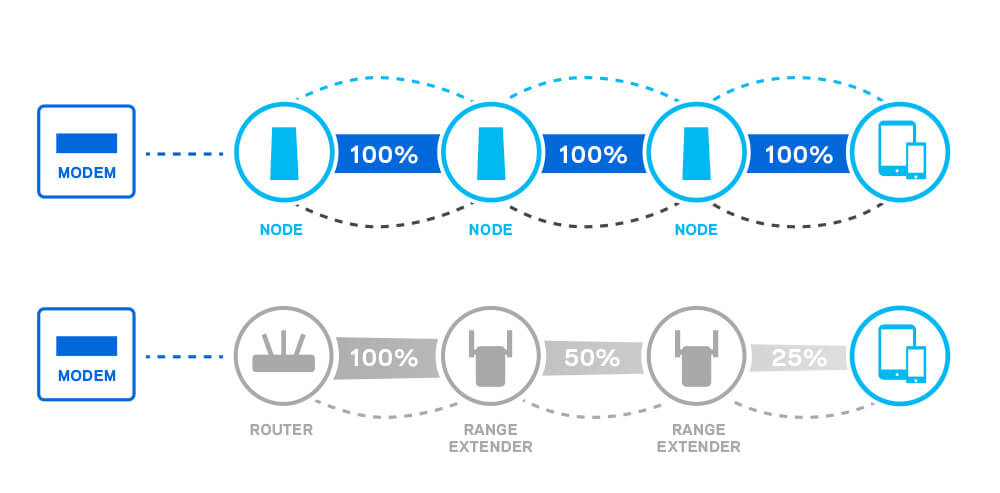
Ein WiFi-Verstärker wird in eine Steckdose gesteckt und sendet das Signal Ihres bestehenden Routers erneut aus. Er erzeugt häufig ein zweites Netzwerk (meinnetz_EXT) und halbiert den Durchsatz, da er denselben Kanal zum Empfangen und Senden nutzt.
- Zwei SSIDs (Hauptnetz + "_EXT")
- Kein Roaming — manueller Wechsel zwischen Netzwerken
- Durchsatz halbiert (Halbduplex-Betrieb)
- Ultra-einfache Installation (in Steckdose stecken)
Vergleichstabelle: Mesh WiFi vs Verstärker
| Kriterium | Mesh WiFi | WiFi Verstärker |
|---|---|---|
| Abdeckung | Ganzes Haus (Multi-Knoten) | Begrenzter Bereich um den Repeater |
| SSID | Ein einheitliches Netzwerk | Zwei Netzwerke (Haupt + _EXT) |
| Roaming | Automatisch und nahtlos | Manuell — Netzwerk wechseln |
| Durchsatz | Erhalten (dedizierter Backhaul) | Halbiert (Halbduplex) |
| Latenz | Niedrig | Hoch (Double Hop) |
| Mehrere Geräte | Hervorragende Verwaltung | Schnelle Überlastung |
| Installation | Geführte Mobile-App | Sehr einfach (Steckdose) |
| Skalierbarkeit | Knoten hinzufügen | 1 Repeater pro Bereich |
| Preis | Höher (Kit mit 2-3 Knoten) | Günstiger (Einzelgerät) |
| Ideal für | Häuser > 80 m², mehrgeschossig | Kleine Wohnung, 1 Funkloch |
4 konkrete Vorteile von Mesh WiFi
1. Langfristig einfachere Bereitstellung
Der Repeater ist schneller installiert, aber das Mesh ist auf Dauer einfacher zu verwalten: eine App, ein Netzwerk, Knoten in wenigen Minuten hinzufügen. Keine Neukonfiguration beim Wechsel der Internetbox.
2. Nahtloses Roaming
Bei einem Verstärker bleibt Ihr Telefon am Hauptnetz hängen, selbst wenn Sie näher am Repeater sind. Das Mesh nutzt die Protokolle 802.11r/k/v, um automatisch zu wechseln — keine Unterbrechung bei Videoanrufen oder Streaming.
3. Erhaltener Durchsatz
Ein Repeater halbiert den Durchsatz, weil er denselben Kanal zum Empfangen und Senden nutzt. Ein Tri-Band-Mesh oder eines mit kabelgebundenem Backhaul (Ethernet oder Glasfaser) erhält an jedem Knoten den vollen Durchsatz.
4. Bereit für WiFi 7
Der Standard WiFi 7 (802.11be) mit Multi-Link Operation (MLO) wurde für Mesh entwickelt. Die 320-MHz-Kanäle und die Tri-Band-Aggregation bieten beispiellose Leistung. Siehe unsere Intel BE200 PCIe WiFi 7 Karte.
Die ultimative Lösung: Glasfaser-Backbone + WiFi
Das Mesh WiFi löst das Abdeckungsproblem, aber der Durchsatz zwischen den Knoten bleibt durch die Funkverbindung begrenzt. Die professionelle Lösung: jeden WiFi-Access-Point per Ethernet-Kabel oder Glasfaserverbindung anschließen. Das ist der kabelgebundene Backbone.
Der kabelgebundene Backbone eliminiert den Durchsatzverlust zwischen den Knoten. Jeder WiFi-AP erhält 100 % des Quelldurchsatzes — keine Aufteilung, keine Verschlechterung.
Elfcam-Produkte für einen Glasfaser- + WiFi-Backbone
- Glasfaser-Konverter — Punkt-zu-Punkt-Verbindung, integriertes SFP, 2er-Pack
- Glasfaserkabel — SC/APC-Patchkabel zum Verbinden der Konverter
- PoE-Switches — versorgen Ihre WiFi-APs ohne Steckdose
- 10G-Switches — Multi-Gig-Backbone für Freebox Ultra und NAS
- CAT 6/7/8 Ethernet-Kabel — RJ45-Hochgeschwindigkeitsverbindung
- SFP/SFP+ Module — für Glasfaser-Switches und Konverter
Einen vollständigen Bereitstellungsleitfaden finden Sie auf unserer Seite Home Fiber — Glasfasernetz zu Hause.
Wann was wählen?
- Kleine Wohnung (< 60 m²)
- 1 einzelnes Funkloch
- Minimales Budget
- Haus > 80 m²
- Mehrgeschossig
- Vernetzte Familie (10+ Geräte)
- Großes Haus (> 150 m²)
- Maximale Leistung
- NAS, 4K/8K-Streaming, Gaming
Tipp
Egal welche Wahl Sie treffen (Mesh oder kabelgebundener AP), verwenden Sie einen Ethernet- oder Glasfaser-Backhaul statt Funk zwischen den Knoten. Das ist der Faktor, der den größten Leistungsunterschied ausmacht.

















